
Customer service automation is the use of technology, mostly AI, to resolve routine customer support requests (answering questions and taking actions like refunds, cancellations or address changes) with little or no involvement from human agents.
This guide explains what that means in practice: the benefits, where automation applies, a 7-step plan to roll it out, and the mistakes to avoid. If you're already comparing vendors, our roundup of the best customer service automation software covers the tools themselves.
It is Monday morning. There are hundreds of tickets in the queue, and at least half of them are asking the same five questions.
Your team is trying to get on top of it, but the queue keeps growing.
The majority of that queue is tickets with predictable answers. They include WISMO, returns, cancellations, and refund requests, and these tickets do not always require a live agent to resolve them.
Instead, you can use customer service automation tools to read incoming requests, take action, and close tickets without necessarily involving your team. This way, your team can focus on resolving more complex issues that require their expertise.
Still drowning in tickets? EvryJewels automates 89% of its tickets with Yuma. Book a demo today to see how it works!
What is customer service automation?
Customer service automation is the use of technology to perform routine customer support tasks with little or no involvement of human agents.
This process involves using advanced technologies such as machine learning (ML), artificial intelligence (AI), robotic process automation (RPA), and retrieval-augmented generation (RAG) to handle repetitive customer tickets previously handled by human agents. As a CX leader in an ecommerce or DTC brand, there are many ways you can automate customer service. Imagine a customer reaches out via live chat to ask about their order. But instead of having your team attend to this ticket, an AI agent gets to work, pulls the customer's order history, and delivers the info they need in seconds.
That's only one of the many ways you can automate customer service.
Here are some other use cases:
- Process returns, refunds, and exchanges for customers without a live agent.
- Manage repetitive FAQ tickets (e.g., sizing, policies, billing, product compatibility) at scale.
- Survive spikes in support tickets during peak season without hiring more support agents.
- Turn support into a revenue channel by answering pre-sale conversations in real time.
The end goal of automation support is to clear the predictable tickets from your queue, leaving your team with tickets that actually require their expertise.
What are the benefits of customer service automation?
Here are five major ways in which customer service automation tools can empower your ecommerce brand:
Provide 24/7 support. A customer who realizes at 11 pm that they need to update their shipping address, or a buyer in Sydney trying to cancel while your North American team is asleep, shouldn't have to file a ticket and hope someone sees it by morning.
One way to provide round-the-clock support for your customers is by providing a self-serve portal. Give customers a search bar and a library of practical, easy-to-follow tutorials, and they will update their preferred payment method or shipping address without having to file a ticket. For requests that need action, AI agents go further. A customer in Australia who needs to cancel an order or change their shipping address at 2 am your time doesn't have to wait for your North American team to start their shift. An AI agent handles it in minutes. Research also confirmed that more executives are seeing significant improvement with generative AI support. A study shows that 72% of executives say their companies' CX metrics have improved, and 52% say AI played a significant role in that improvement.
Reduce customers' wait time. A customer who contacts support about a discount code that expired before they could use it needs an answer in minutes, not hours. By the time your team replies the next morning, they have either bought elsewhere or lost interest.
Automation closes the gap between when a customer sends a query and when they get their first reply. That way, you can answer a prospect's pre-sale question in minutes and respond to a customer's question about returns without risking a chargeback.
Minimize human errors. Imagine this: your agents are juggling dozens of tickets, and because they are dealing with a high volume, they skim through some of them. These skimmed tickets get a generic reply, or worse, the information they provide to the customers isn't correct. Automation breaks that cycle. With automation customer service software, you can ensure that tickets don't fall through the cracks, reducing the likelihood of mistakes or missed tickets.
Give human agents time to focus on more important issues. Automating repetitive tasks frees up more time for your agent to focus on resolving more important issues.
Instead of assigning a human agent to "where's my order" (WISMO) requests, you can automate the process with an AI agent. AI agents can integrate with your order management system, retrieve customers' tracking numbers, and provide accurate order details without involving a human support agent.
That leaves your support team to handle complex issues that require empathy, such as resolving a customer complaint about damaged goods.
Cost-efficient and scalable. If done correctly, customer service automation saves money in obvious ways. It reduces the need to hire and train additional support agents to handle monotonous, repetitive tasks.
McKinsey states that companies that use technology to revamp the customer experience can reduce operational costs by up to 40%.
Aside from reducing operational costs, customer service automation is also scalable. So as your business grows and ticket volume doubles, you don't have to increase your headcount.
Key applications of customer service automation (plus examples)
Here are a few ways to automate your customer service:
| Key customer service automation application | What it does |
|---|---|
| AI agents | Resolve tickets autonomously end-to-end, escalate complex issues to humans with full context when necessary. |
| Multichannel and multilanguage | Route and manage tickets from every channel in one system. Provides support in multiple languages. |
| AI analytics | Surfaces patterns that a human reviewing spreadsheets would miss. |
| Self-service portals & tools | Lets customers find answers themselves via a knowledge base article, an FAQ, a video tutorial, or a troubleshooting guide. |
AI agents
Generative AI agents are designed to resolve support tickets autonomously, sometimes within seconds. When a request is too complex, they hand it off to a human agent with full context, so your customer doesn't need to have the conversation again. The major difference between generative AI agents vs chatbots is that traditional rule-based chatbots follow a rigid structure, and responses are often pre-programmed. If a customer's request doesn't fit neatly into a specific category, the chatbot hits a roadblock. Generative AI agents, on the other hand, don't just provide answers. They understand the meaning behind customer queries, ask follow-up questions when necessary, and, more importantly, resolve issues autonomously. When a situation is too complex, they can also escalate it to the appropriate team for further assistance to your customers.
A good example is Yuma Support AI. Yuma follows one written Handbook of your policies and reads from your store, helpdesk, subscriptions, and marketing platform in real time, so every reply has the full context behind it.
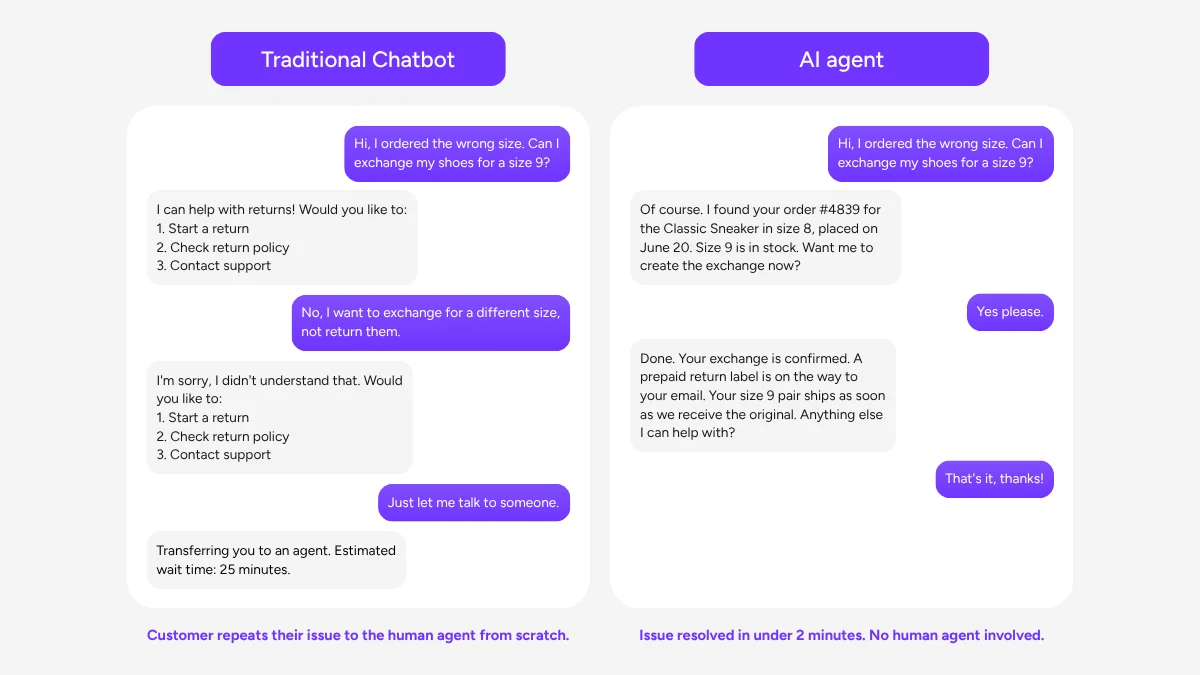
With this data, Yuma can handle everyday ecommerce tickets from start to finish, pulling order data, verifying policies, and replying in your brand voice.
Multichannel and multilingual support
Not all your customers stay on one channel. Some send their queries via live chat, while others might send a DM on Instagram or even an email.
With customer service automation software, you can route and manage tickets from every channel into a single system. Yuma, for example, covers 25+ channels from one Handbook, including phone calls with Yuma Voice. Every channel follows the same playbooks, and brand pages let you set a different tone per channel. That means you can use a more formal voice in email and be more conversational in chat.
Yuma also auto-detects the customer's language and responds in it automatically, in multiple languages, including right-to-left scripts. So if your Handbook is written entirely in English, for instance, you can still serve a French customer in French, a German customer in German, and an Arabic customer in Arabic, without any manual setup or multilingual agents.
AI analytics
AI analytics tools collect and analyze customer data automatically across every ticket, conversation, and interaction. It surfaces patterns that a human reviewing spreadsheets would miss.
Instead of waiting for end-of-month reports, support teams get a live picture of what's happening: which issues are spiking, which ticket types take the longest to resolve, and where customers are dropping off. With this data, you can identify recurring pain points and track the performance of your support operations in real time.
Yuma addresses this through two features. First is Deep Search, a feature that lets your team ask plain-language questions over your full support ticket history and get structured, evidence-backed answers.
The second is a live automation health dashboard that tracks resolution and escalation rates, as well as automation performance, in real time.
Self-service portals & tools
Self-service lets customers find answers without waiting for a support agent. That might be a knowledge base article, an FAQ, a video tutorial, or a troubleshooting guide. This reduces support tickets and enhances customer satisfaction by allowing customers to resolve issues on their own terms, at any time of day.
Yuma's Chat AI takes this further. It embeds a chat widget directly on every page of a brand's website. A customer with a question can click the widget to get an answer immediately, sourced from the brand's Handbook and real-time order data.

Questions that are beyond Chat AI's scope are then handed off to a human agent with the full chat history attached, so the customer never has to repeat themselves.