9 Best Customer Service Automation Software Tools for 2026
A practical 2026 comparison of customer service automation software, focused on resolution depth, ecommerce fit, pricing models, implementation tradeoffs, and buying questions.
1 / 14From adoption to resolution: how to evaluate any automation tool
Key takeaways
Judge any tool on whether it takes actions or just suggests them, how it escalates, and whether pricing tracks resolutions.
Gartner predicts agentic AI will autonomously resolve 80% of common customer service issues by 2029, leaving 20% for humans.
A Gartner survey of 321 customer service leaders found 91% face executive pressure to implement AI in 2026.
IBM research names data (49%), trust (46%) and skills shortages (42%) as the top barriers to agentic AI adoption.
Start with a narrow set of high-volume use cases like WISMO, returns and cancellations, prove resolution, then expand.
If you're evaluating customer service automation software, you've probably already noticed that most tools promise similar things: faster responses, lower costs, happier customers.
What's harder to gauge from a feature list is how many tickets the AI actually closes, versus how many it hands back to an agent to finish. This list uses that as its editorial lens. Yuma, the platform that published this article, is included in the comparison and evaluated on the same criteria as every other tool.
From adoption to resolution: how to evaluate any automation tool
Comparing customer service automation software is easier when you know what to look for. These three questions can reveal more about how a tool actually performs than anything on a feature list or a demo call.
Does it take actions, or just suggest them?
There's a difference between a tool that drafts a reply for your agent to approve and one that cancels an order, issues a refund, or updates a subscription without anyone in the loop. While the first can reduce handle time, the second can reduce headcount dependency.
When evaluating any tool, ask for a specific demonstration of end-to-end resolution on your highest-volume ticket types. If the demo shows suggested replies rather than completed actions, that's how the tool will perform in production.
How does it handle the things it can't resolve?
Gartner predicts agentic AI will autonomously resolve 80% of common customer service issues without human intervention by 2029. That still leaves 20% that need to reach a human cleanly. A tool that gets stuck, loops, or sends a confused reply on an unusual request creates downstream problems your agents end up solving manually.
Ask every vendor: what triggers an escalation, how does the handoff work, and can the AI re-engage after a human steps in? How that handoff works determines whether automation reduces your team's workload or adds to it.
What does the pricing model tell you about incentive alignment?
A vendor charging per conversation gets paid if your customer's issue was resolved or not. A vendor charging per fully resolved ticket only gets paid when it was. When you’re dealing with thousands of tickets a month, the model you choose determines whether your automation costs track your outcomes or just your volume.
Quick comparison: 9 customer service automation tools at a glance
The right customer service automation software can take over repetitive tasks that prevent your agents from using their time most effectively. The table below covers nine tools across target use case, resolution approach, and pricing model.
Features and pricing accurate as of publish date. Verify current details directly with each vendor. This article is published by Yuma AI, one of the tools listed.
Tool
Best For
Resolution Approach
Pricing Model
Yuma 2.0
Ecommerce teams that want full resolutions, not just replies (Shopify + Gorgias or Zendesk, 3,000+ tickets/month)
Autonomous resolution
Per fully resolved ticket
Gorgias AI
Ecommerce brands already on Gorgias
AI-assisted automation
Per ticket + per resolution
Siena AI
DTC ecommerce brands
Autonomous resolution
Per conversation
Zendesk AI
Mid-to-large teams already on Zendesk
AI-assisted automation
Per agent + AI add-ons
Intercom
SaaS and ecommerce teams using Intercom
Autonomous resolution
Per resolution + seat fees
Ada
Large enterprises across multiple industries
Autonomous resolution
Custom (contact sales)
Tidio
SMB ecommerce brands starting with automation
AI-assisted automation
Per conversation + AI add-on
Kustomer
Teams wanting CRM and AI in one platform
AI-assisted automation
Per agent + AI add-ons
Freshdesk
Teams already on Freshdesk
AI-assisted automation
Per agent + session-based AI add-ons
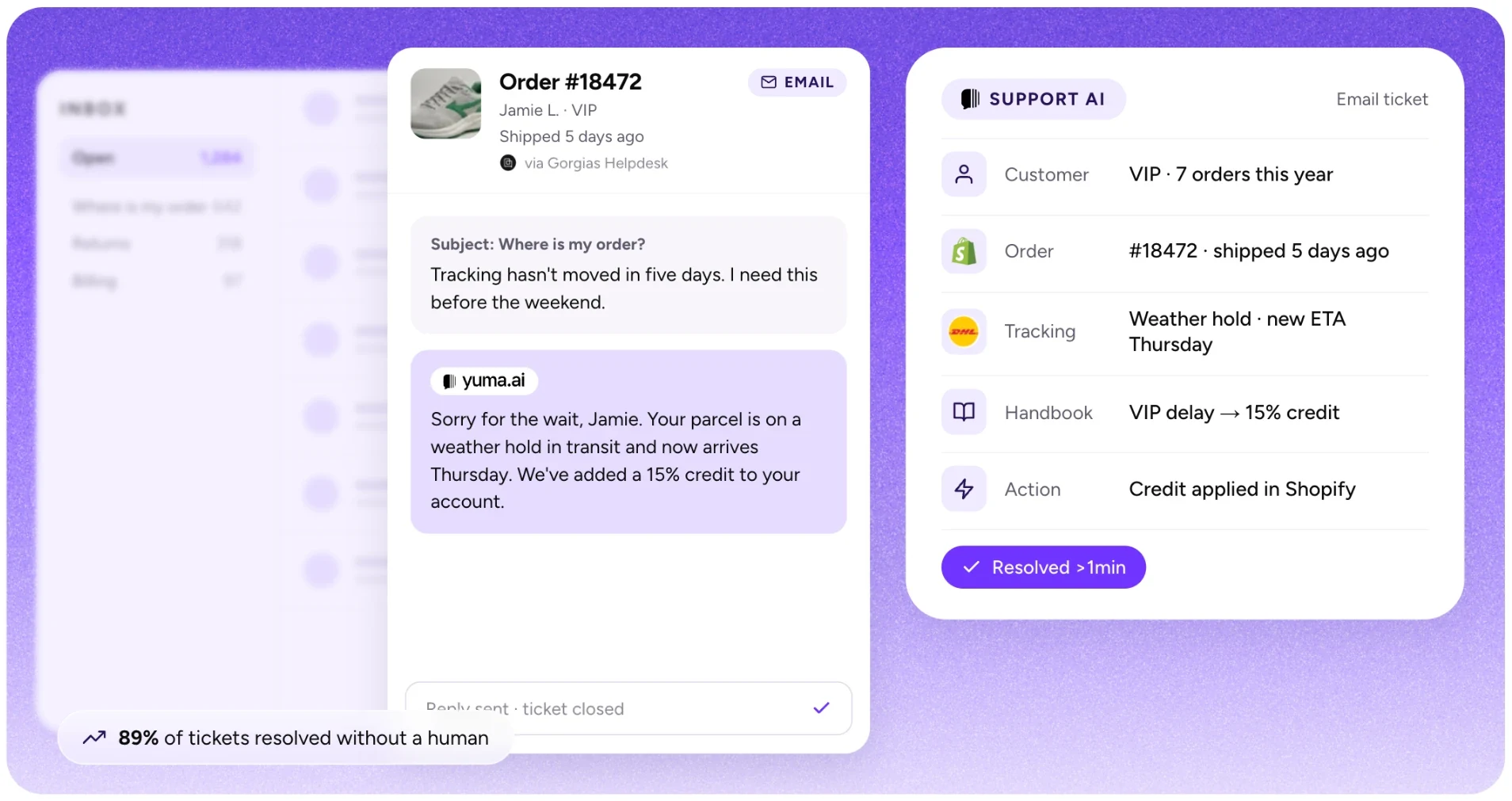
Yuma AI
Image source: Yuma AI
Yuma is an AI customer service platform for ecommerce brands. With Yuma 2.0, one written Handbook, managed in plain language, runs every customer conversation across email, chat, SMS, WhatsApp, social DMs, outbound outreach and phone calls. Ask Yuma writes the Handbook from your SOPs or real tickets, every playbook carries its own tests, and changes roll out gradually. Yuma works inside your existing helpdesk, takes actions in your backend, and with Web Actions can complete tasks in tools that have no API.
Where many tools in this category assist agents with suggested replies, Yuma is designed to close tickets without agent involvement, resolving the ticket types that make up the largest share of ecommerce support volume: WISMO, returns, exchanges, subscription changes, and order edits.
What Yuma covers
Yuma works inside your existing helpdesk, resolving tickets end to end without your team switching tools or rebuilding workflows.
Helpdesk integrations: Gorgias, Zendesk, Kustomer, Re:amaze, Front
Channels: email, chat, SMS, WhatsApp, social DMs and outbound email and SMS, all from one Handbook, plus phone calls with Yuma Voice, which answers your support line 24/7 and takes backend actions mid-call
Web Actions: Yuma drives a real Chrome browser to complete tasks in tools with no API, like carrier claim portals. You set one up by recording a video of the task once, and the tool needs to be reachable from a browser on the open web, without a VPN
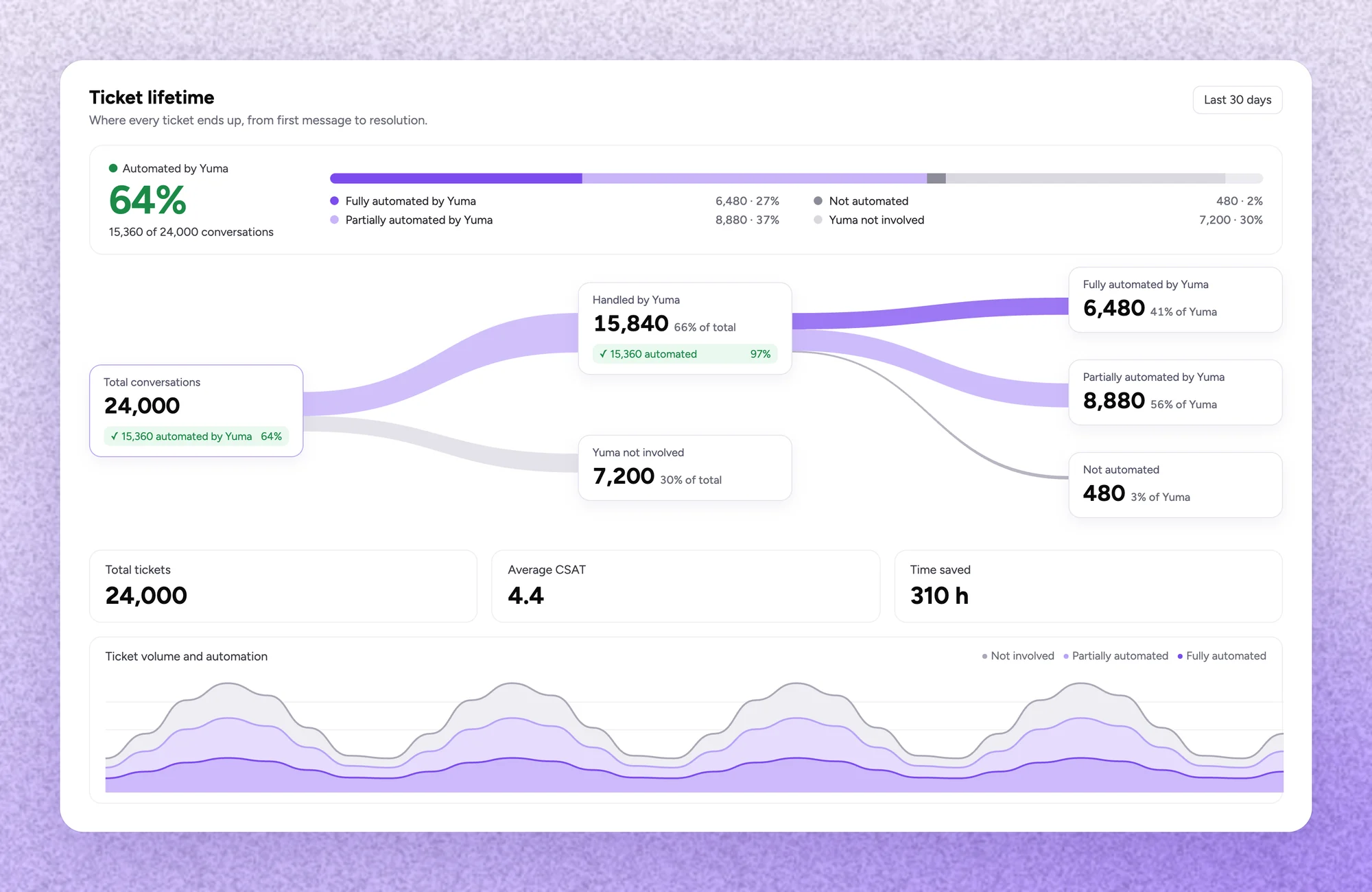
Illustration: Yuma 2.0
Actions, not just answers
Running Yuma + Gorgias + Shopify or Yuma + Zendesk + Shopify, the AI executes actions directly inside the ticket thread. Instead of delivering suggestions for an agent to act on later, it can complete actions to close the ticket automatically. That includes:
Cancelling or modifying orders
Issuing refunds
Managing subscriptions
Creating returns and exchanges
Generating return labels
Issuing gift cards
Resolving billing issues and payment failures
Answering product questions
Quality architecture
These features define how Yuma controls what the AI does and doesn't do.
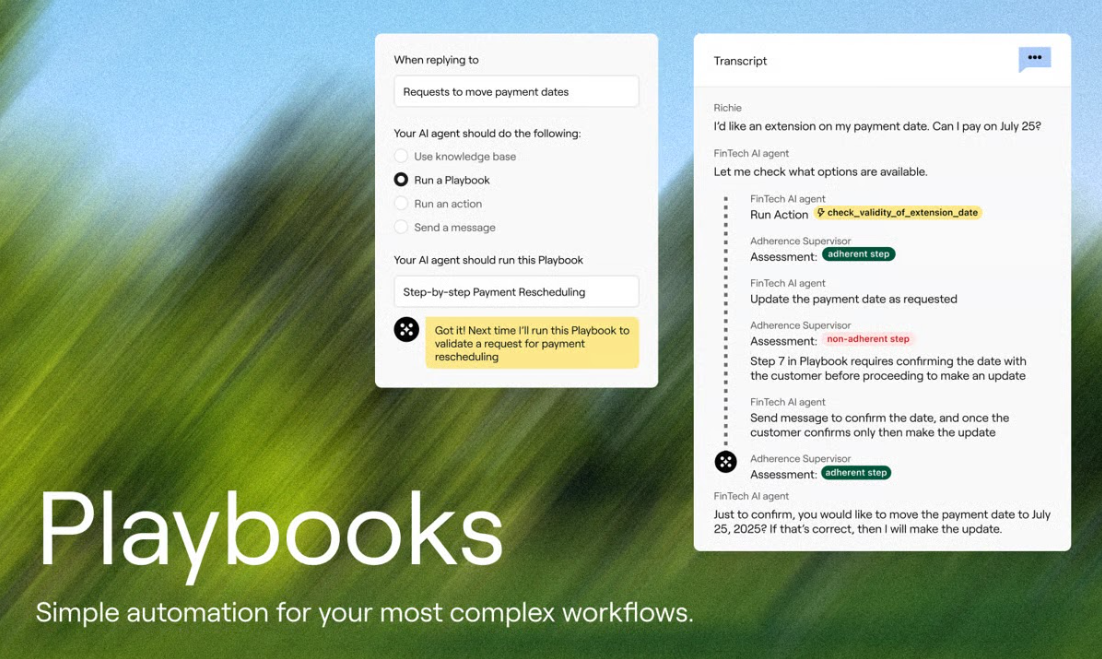
The Handbook is one versioned source of truth: brand pages, playbooks and procedures, written with Ask Yuma. Every change lands as a draft, and nothing goes live until a human publishes it.
Tests come with every playbook: example situations with the outcome you expect. On every change, Yuma reruns them as simulated conversations, with nothing real touched, and a failing test points to the page that needs fixing.
Gradual rollout lets any playbook go live on a small share of matching conversations, for example 10%, with the rest handled as drafts your team reviews in the helpdesk.
Safety Guard runs quality control checks across multiple models before any AI-drafted reply reaches a customer. Responses flagged for accuracy or policy compliance are paused for human review before sending.
Hard Limits are system-enforced caps on refund amounts, coupon values, and loyalty points. Unlike soft guidelines, these cannot be overridden by the AI regardless of what a customer requests.
Fraud Shield detects risky patterns before they become chargebacks (address mismatches, rapid-fire card attempts, suspicious IPs) and escalates flagged tickets to your fraud team automatically.
Playground lets teams test changes against real historical tickets, simulating actions and previewing replies without executing anything in production.
When the Handbook doesn't cover a request, Yuma doesn't improvise. It hands the conversation to your team and logs the gap as an open question to answer once.
Verified results
EvryJewels: 89% of tickets automated, 63% lower cost
Javvy Coffee: 70% automation, response time from 24 hours to 12 minutes
Implementation
Live within a week
First 30 days free
No engineering resources required
3 to 5 hours per week from your team: Ask Yuma drafts the Handbook from your SOPs and tickets, and Yuma's account managers review it with you
SOC 2 Type II certified
Limitations
Requires a supported helpdesk and commerce platform
No self-serve option
Not suited to SaaS or B2B support operations
Best for
Ecommerce teams that want full resolutions, not just replies: brands on Shopify + Gorgias or Zendesk, handling 3,000 or more tickets per month, with a CX team of 5 to 50 agents.
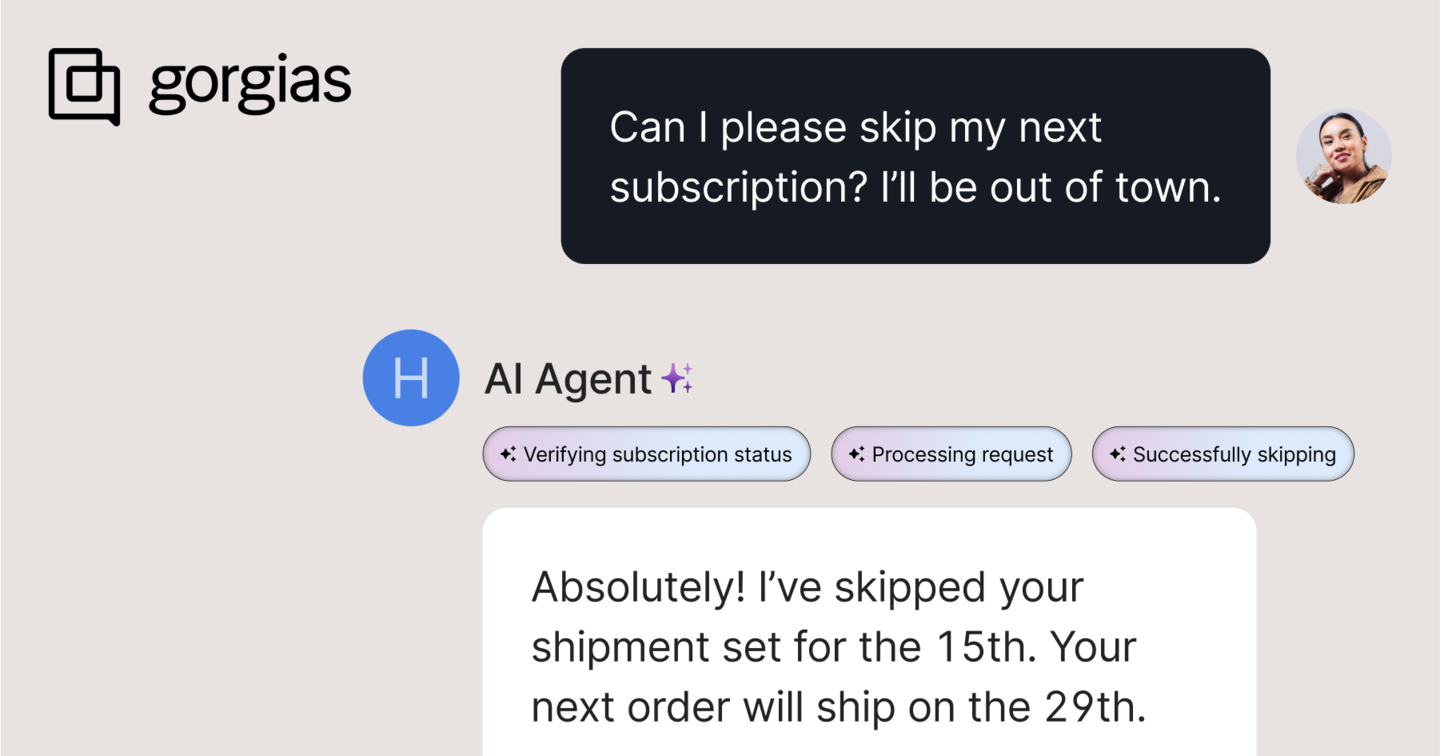
Gorgias is an ecommerce helpdesk with AI built natively into the platform. Unlike standalone AI tools that sit on top of a helpdesk, the AI Agent is part of the same product your team already uses for ticket management.
What it does
The AI Agent handles customer-facing conversations: answering questions, managing order actions, and resolving common requests. The broader helpdesk centralizes email, chat, social, SMS, and voice in one workspace. For Shopify brands already running Gorgias, the AI layer sits directly on top of the existing setup with no additional integration required.
Where it fits
Shopify brands that want AI automation without adding another tool to their stack
Teams already comfortable in Gorgias where the primary channels are email and chat
Brands that want native order data access (cancel orders, issue refunds, check shipping status) without leaving the helpdesk
Pricing charges per helpdesk ticket and per AI resolution, so at volume, costs can be difficult to forecast. One G2 reviewer notes: "It's a bit too expensive. I would like it to be more affordable or offer AI services at an integrated cost"
Training and configuring the AI requires careful setup. One G2 reviewer notes: "There are a lot of rule nuances and automation layers that require careful setup, and the learning curve can be steep when optimizing for more advanced use cases"
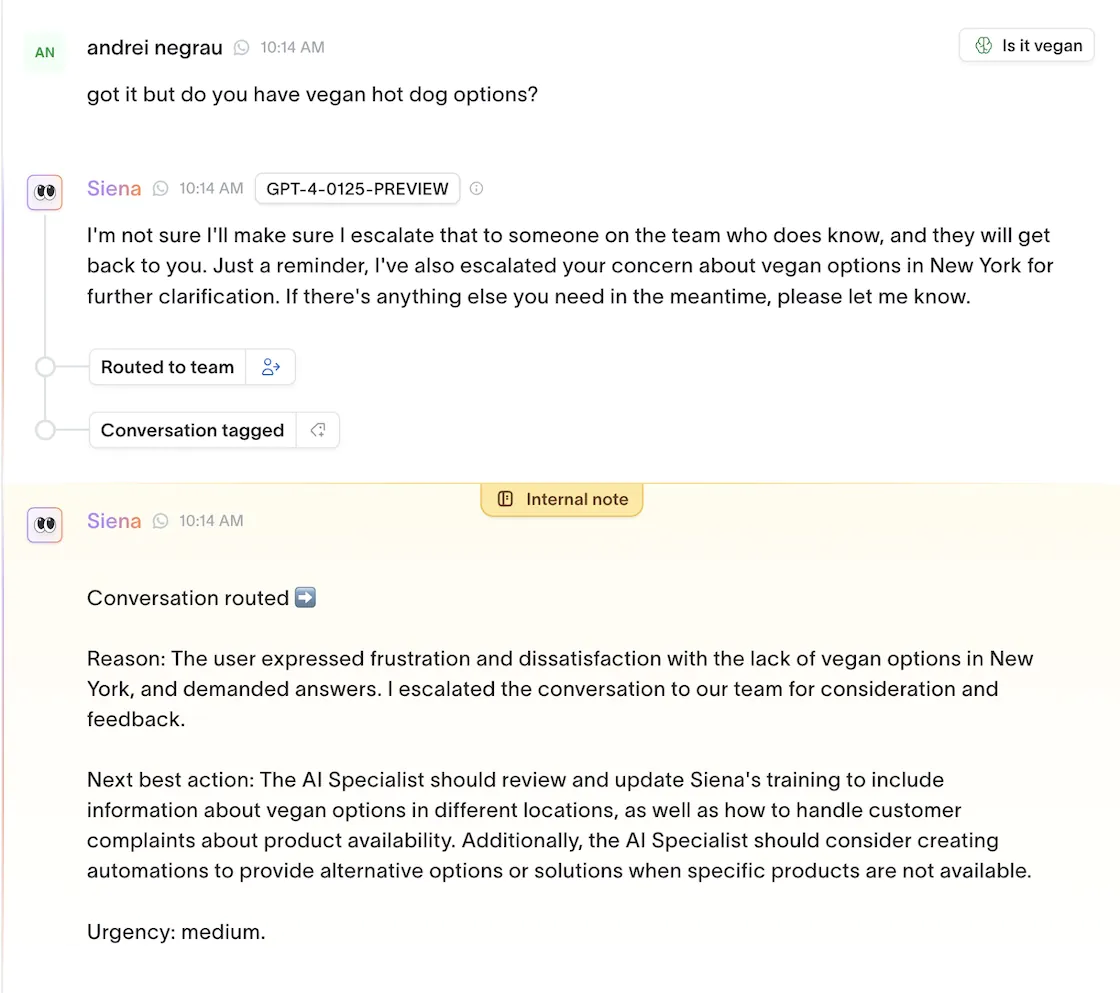
Siena is an AI-native customer experience platform built for DTC ecommerce, positioning around what it calls empathic AI: autonomous support that matches brand tone closely enough that customers can't tell they're talking to an AI. It runs across email, chat, WhatsApp, SMS, and social channels, and sits on top of your existing helpdesk rather than replacing it.
What it does
Siena's Cognitive Reasoning Engine handles customer conversations end to end (processing returns, tracking orders, updating accounts) without human intervention. Siena’s implementation is largely self-serve, meaning brands train the AI on their own voice, policies, and product catalog through the platform's dashboard, without needing an engineer or external onboarding team.
Where it fits
DTC brands in health, beauty, fashion, and lifestyle where brand voice consistency across channels is a priority
Teams that want broad social channel coverage (WhatsApp, Instagram DMs, SMS) handled by the same AI layer as email and chat
Teams that want to move fast: Siena's setup is handled in-product without a dedicated onboarding team
Limitations
Occasional AI inaccuracy issues in responses. G2 reviewers note these are addressable but require ongoing monitoring and fixes
Routing issues are a recurring theme, with some users reporting conversations handled by the wrong intent or escalated unnecessarily
Per-conversation pricing means you're charged whether or not the issue was resolved
Zendesk AI
Image source: Zendesk
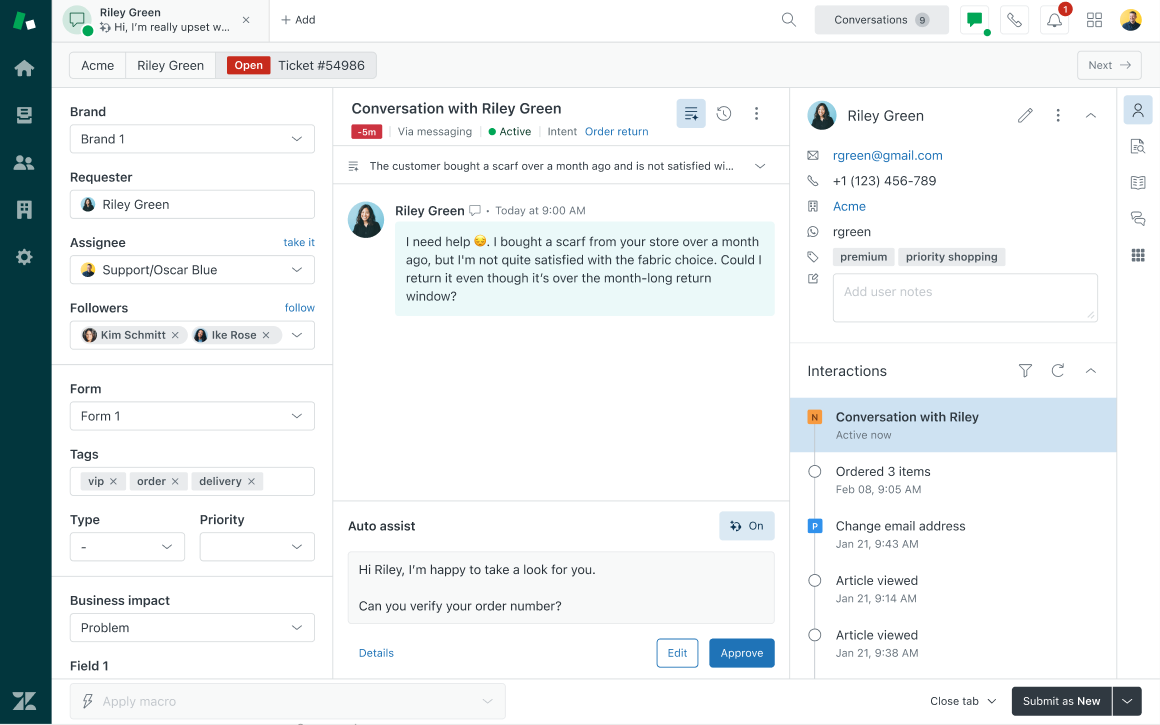
Zendesk is a horizontal customer service platform serving businesses across most industries. Its AI layer, the Resolution Platform, sits on top of the core helpdesk, adding AI agents, workflow automation, and a knowledge graph designed to move from ticket deflection toward end-to-end resolution.
What it does
Zendesk's AI agents handle inbound tickets autonomously on chat and messaging channels, with the ability to look up orders, process refunds, and escalate to human agents when needed. The Advanced AI add-on adds intelligent triage, smart reply suggestions, and macro recommendations for agents. Shopify, BigCommerce, WooCommerce, and Magento all integrate via the app marketplace.
Where it fits
Mid-to-large teams already on Zendesk that want to add AI automation without switching platforms
Businesses with complex multi-channel support needs across voice, email, chat, and social
Teams that need a broad integration ecosystem
Limitations
One G2 reviewer notes: "The per-agent pricing adds up quickly as you scale, making it expensive for growing teams"
Configuration takes longer than expected. G2 reviewers consistently flag a steeper learning curve than sales demos suggest, particularly for advanced automation
Ecommerce-specific workflows require additional configuration rather than shipping as defaults
Comparing Zendesk AI costs for your ecommerce team? Yuma's ROI calculator breaks it down.
Intercom
Image source: Intercom
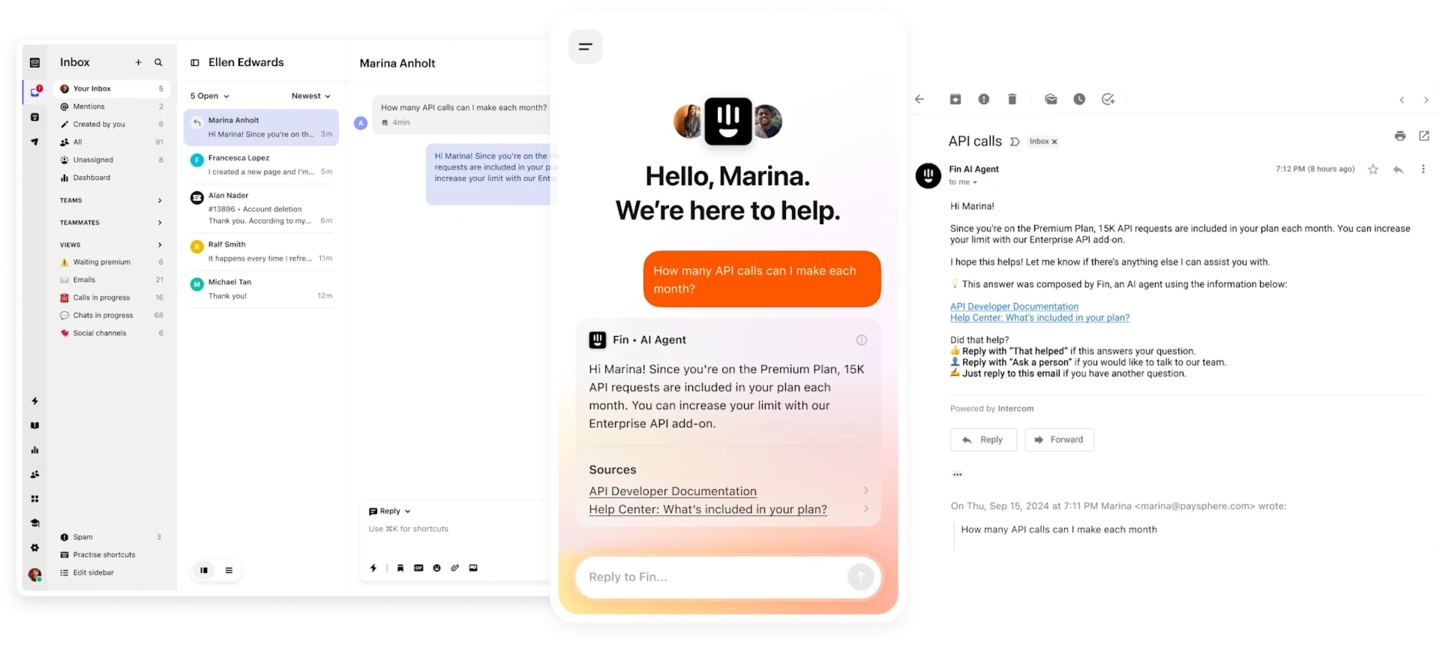
Intercom is a customer service platform built around messaging-first support, with Fin as its AI agent layer. In May 2026 the company launched Fin for Ecommerce, bringing pre-purchase shopping assistance and post-purchase support under the same agent, aimed specifically at Shopify merchants.
What it does
Fin handles inbound conversations autonomously across chat, email, WhatsApp, and SMS, resolving common requests and escalating to human agents when needed. It trains on your help center and knowledge sources, and can execute actions via Fin Tasks and third-party connectors. The broader Intercom platform includes a shared inbox, ticketing, and outbound messaging tools in one workspace.
Where it fits
SaaS and ecommerce teams already using Intercom that want to add autonomous AI resolution without switching platforms
Teams that want pre-purchase and post-purchase support handled by the same AI layer
Businesses with broad channel coverage needs across chat, email, WhatsApp, and SMS
Limitations
Fin can struggle with complex or specific queries. One G2 reviewer notes: "Sometimes Fin does not fully understand complex or very specific customer queries. In such cases, the response may not be very accurate, and the conversation needs to be handled by a support agent"
Total cost compounds quickly. One G2 reviewer said: “Compared to other AI chatbot solutions we’ve evaluated, Fin’s pricing feels high, especially for teams handling large ticket volumes”
Ada is an enterprise AI customer service platform built for large-scale, cross-industry deployments. It runs across chat, email, voice, and SMS, with a Unified Reasoning Engine that handles complex, multi-step queries across channels. It integrates with Zendesk, Salesforce, and Shopify, and is designed for organizations handling 300,000 or more customer conversations per year.
What it does
Ada's AI agents handle inbound queries autonomously, resolving order status, returns, account updates, and subscription management without human intervention. The platform is built around trainable AI: teams coach the agent using guidance, test outcomes, and refine behavior without writing code. It supports 50+ languages and deploys across live chat, email, voice, and social messaging.
Where it fits
Large enterprises with high conversation volumes across multiple channels and regions
Teams already on Zendesk or Salesforce, since Ada's full feature set requires one of these as the connected helpdesk
Organizations in regulated industries where HIPAA and SOC 2 compliance are requirements
Limitations
Workflow setup requires significant manual work. One G2 reviewer notes: "The setup process for flows sometimes requires more manual work and testing than expected, especially when compared to platforms that offer stronger built-in discovery features"
Zendesk integration can be difficult to configure. One G2 reviewer notes multiple workarounds were needed to make it work
The AI has occasionally offered actions it cannot perform, including canceling orders. G2 reviewers note this is correctable with coaching but requires ongoing monitoring
Tidio
Image source: Tidio
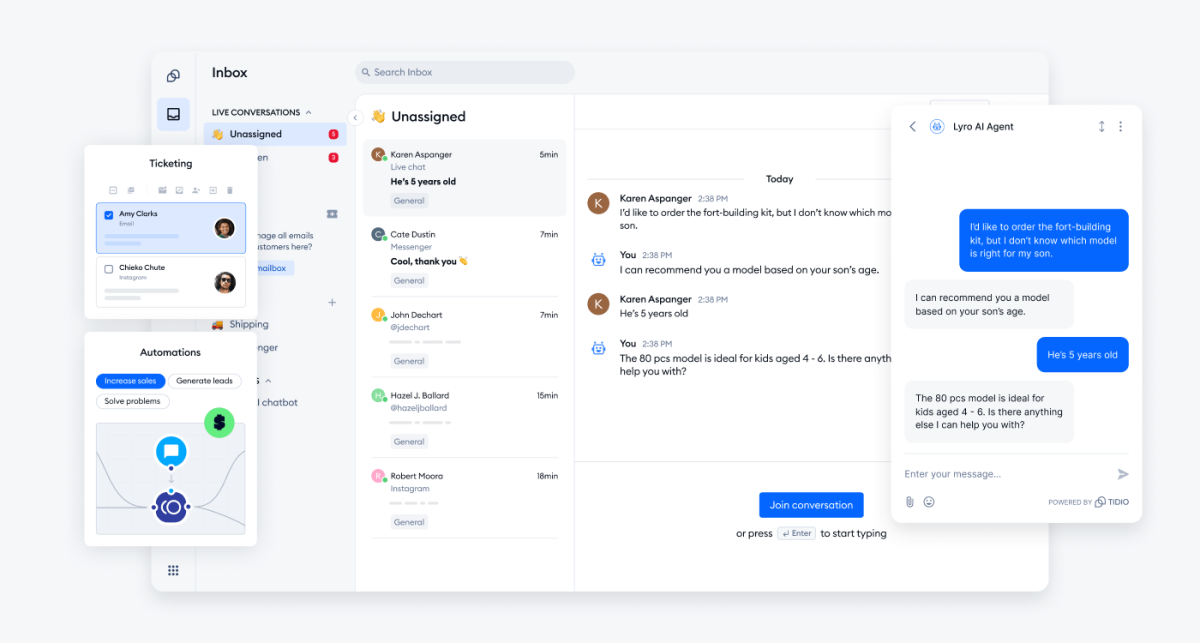
Tidio is a live chat and AI automation platform built for small and mid-sized ecommerce businesses. Its AI layer, Lyro, handles common customer questions autonomously based on your support content, while the broader platform centralizes chat, email, social messaging, and automation flows in one workspace.
What it does
Lyro learns from your existing knowledge base content and help center articles, with no manual scripting required. It handles common queries, recommends products, checks order status via Shopify integration, and transfers conversations to human agents when needed. The platform also includes Flows, a no-code drag-and-drop automation builder for building triggered support and sales workflows.
Where it fits
Small to mid-sized ecommerce brands that want live chat and AI automation without enterprise pricing
Teams that want fast setup: Tidio is designed to launch quickly without developer resources
Shopify stores that want AI to handle product questions and order status checks within the chat widget
Limitations
Lyro AI is a separate paid add-on: base plans, AI conversations, Flows automation, and branding removal are all billed separately
AI capability is limited for complex queries. One G2 reviewer notes: "While the AI capabilities are useful for basic tasks, they still occasionally struggle with more complex customer queries and could use further refinement"
Lyro can only answer questions covered in your support content. As Tidio's own documentation states: "If the answer is not part of your support content, Lyro will automatically forward the question to a human agent"
Kustomer
Image source: Kustomer
Kustomer is an AI customer service CRM that organizes support around the customer rather than the ticket. Every interaction (across email, chat, SMS, social, and voice) sits in a single chronological timeline alongside order history and previous conversations, giving agents full context without switching tools.
What it does
Kustomer's AI Agents for Customers handle inbound queries autonomously across channels. AI Agents for Reps act as a copilot layer, surfacing suggested replies, summarizing conversations, and automating repetitive tasks for human agents. The Shopify integration pulls order data directly into the customer timeline, so agents can process refunds and check order status without leaving the platform. The platform also includes sentiment analysis, flagging frustrated or urgent customers for agent attention.
Where it fits
Mid-market and enterprise ecommerce brands that want CRM and support automation in one platform
Teams running high volumes across email, chat, SMS, social, and voice who need full conversation context in one view
Brands on Shopify, Magento, or BigCommerce that want order data surfaced automatically in every conversation
Limitations
One G2 reviewer notes: "Creating custom reports can sometimes be complex and less intuitive for non-technical users"
Performance can lag during high-volume periods. Another G2 reviewer notes: "It can occasionally feel slow or laggy, particularly when loading lengthy customer timelines or when switching between several sessions"
Setup is more technical than it appears. According to one G2 reviewer: "The workflows are a lot more technical than initially stated. We didn't know we would need someone who knows how to read JSON. Many things that you would think are simple actually take a lot more effort"
Freshdesk
Image source: Freshdesk
Freshdesk is a general-purpose helpdesk platform within the Freshworks ecosystem, with Freddy AI as its built-in automation layer. Freddy covers two modes: an AI Agent for customer-facing automation and Copilot for agent assist. For teams already on Freshdesk, it's the native path to adding AI without switching platforms.
What it does
Freddy AI Agent handles inbound queries autonomously across email and chat, with pre-built workflows for order tracking, refund processing, and subscription changes via Shopify, Stripe, and FedEx integrations. Freddy Copilot works inside the agent workspace, suggesting replies, summarizing tickets, and surfacing relevant knowledge articles. Both are add-ons to base Freshdesk plans.
Where it fits
Teams already using Freshdesk that want to add AI automation without migrating to a new platform
Mid-sized support teams handling high volumes of routine tickets across email and chat
Businesses in the Freshworks ecosystem (Freshdesk, Freshchat, Freshsales) that want AI across multiple products
Limitations
Freddy AI Copilot and Freddy AI Agent are paid add-ons, not included in base plans. A G2 reviewer says: "For their AI, we need to pay extra, and because of that, we are not able to use it. It's better if the AI is provided in the same license"
Freddy AI currently only replies to the first email in a thread: if a customer follows up, a human agent takes over. This is a documented product limitation that directly affects ecommerce support, where conversations frequently span multiple exchanges
Advanced reporting is restricted to higher-tier plans. One G2 reviewer notes: "More detailed analysis often requires additional configuration or external reporting workflows"
Adopting AI and resolving tickets with it are two different things
Every tool in this list operates differently. Some assist agents with suggested replies and smarter routing. Others close tickets end-to-end without a human in the thread. That distinction has a direct bearing on cost per ticket, headcount requirements, and what your team actually spends its time on.
A Gartner survey of 321 customer service leaders found 91% report executive pressure to implement AI in 2026. But IBM research from the same period found that concerns around data (49%), trust (46%), and skills shortages (42%) remain the top barriers to agentic AI adoption. The pressure to implement and the conditions needed to do it well don't always line up.
In our experience, the teams that navigate it best don't start by automating everything. They pick a narrow set of high-volume use cases (WISMO, returns, order cancellations), prove end-to-end resolution on those first, and expand from there. The most common implementation mistakes tend to happen when teams skip that step.
The tool you choose should make that path straightforward. Look at escalation design, pricing model, and time to first value. Building a solid framework for AI customer service before committing to a platform makes that evaluation significantly easier.
Your customers don't care which AI you use
Your customers won't know whether their refund was processed by an AI agent or a human. They'll know whether it was processed.
Ecommerce support queues tend to fill up with the same ticket types: WISMO, returns, refunds, order changes. Whether your automation handles them completely or hands them back to an agent to finish is what makes the difference between a tool that reduces your team's workload and one that removes it.
Yuma is built for the second outcome:
Works alongside Gorgias, Zendesk, and other helpdesks, with no re-platforming required
Runs every channel, including phone calls, from one Handbook that Ask Yuma writes and tests
Executes actions end to end inside the ticket thread: refunds, exchanges, cancellations, subscription changes, and more
30-day free trial, and most brands are live within a week
SOC 2 Type II certified
If you're still narrowing down your shortlist, our broader comparison of AI tools for customer support covers additional platforms not in this list.
See Yuma in action
Yuma resolves WISMO, returns, refunds, and order changes inside your existing helpdesk: Gorgias, Zendesk, Kustomer, Re:amaze. Most brands are live within a week. You only pay for tickets Yuma fully resolves.
Frequently asked questions about customer service automation software
What is customer service automation software and how is it different from a helpdesk?
A helpdesk organizes and routes tickets. Customer service automation software resolves them, pulling order data, applying policies, and closing tickets without a human in the loop. Several modern AI customer service platforms combine both, but the degree to which they actually resolve tickets (versus assisting agents to do so) varies significantly across tools.
How do I measure whether customer service automation software is actually resolving tickets?
Look at fully automated resolution rate: the percentage of tickets closed without any agent involvement. This is different from deflection rate (tickets avoided) or automation rate (tickets touched by AI). For CX AI performance metrics that go deeper, cost per ticket and first response time are some of the most useful benchmarks alongside resolution rate.
Which customer service automation software works best for Shopify ecommerce brands?
It depends on your helpdesk. If you're on Gorgias, both Gorgias AI and Yuma are purpose-built for Shopify. If you're on Zendesk, Yuma integrates directly and handles ecommerce-specific actions (refunds, exchanges, WISMO) inside the ticket thread. For brands prioritizing autonomous resolution over AI-assisted automation, Yuma is built specifically for that use case on Shopify.
Can customer service automation software handle returns, refunds, and order cancellations automatically?
Some can, some can't. Tools that offer AI-assisted automation will draft a response for an agent to approve. Tools that offer autonomous resolution, like Yuma, execute the action directly: processing the refund, creating the return, cancelling the order, without agent involvement. The distinction comes down to whether the tool has direct API access to your commerce platform and the action-taking capability to use it.
What's the difference between an AI agent and an AI copilot in customer service software?
An AI copilot assists human agents by suggesting replies, surfacing relevant articles, and summarizing threads. An AI agent operates autonomously, reading the ticket, taking the required action, and closing it without a human in the loop. Copilots reduce handle time. Agents reduce ticket volume. Many platforms can offer both, so always ask vendors what percentage of tickets their AI can resolve completely without any agent involvement.